

Download Super Utilities Pro – system cleaner, privacy protection, registry cleaner, malware removal, system optimization
Overview
Super Utilities Pro is a comprehensive software suite designed to optimize system performance, protect user privacy, and safeguard against malware on mobile devices. The app addresses common challenges faced by smartphone users, including slow performance, privacy breaches, and system clutter. It is tailored for individuals seeking a unified solution to manage their device's health and security.
While the developer, Super Utilities Pro, has not provided detailed background information, the app's functionality suggests a focus on utility and productivity. Real-world use cases include cleaning up storage space, protecting sensitive data, and enhancing device speed. In the current mobile ecosystem, where users demand efficient, all-in-one tools, Super Utilities Pro fills a valuable niche by offering a range of essential utilities in a single interface.
Its multi-faceted approach to system maintenance and security makes it a notable contender in the productivity category.
Key Features & Functionality
- Privacy Protection: The Privacy Protector module enables users to hide or lock folders, securely delete files, and password-protect sensitive applications. This helps prevent unauthorized access to personal data, making it ideal for users concerned about privacy on shared devices.
- System Maintenance: This feature includes tools for managing device tasks, customizing settings, and accessing system information. It allows users to monitor and tweak their device's performance, ensuring optimal operation over time.
- Special Tools: The Special Tools module offers functionalities like scheduling automatic shutdowns, identifying space-consuming files, and modifying context-menu options. These tools enhance flexibility and control, allowing users to automate routine tasks and customize their experience.
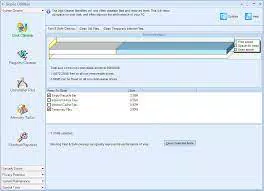
- System Cleaner: This comprehensive toolset performs disk and registry cleaning, removing unnecessary files and optimizing system resources. By clearing clutter, it helps improve device responsiveness and free up storage space.
- Security Doctor: The latest addition, Security Doctor, provides malware detection and prevention. It features a fast scanner capable of removing problematic components and includes a start-up manager for better control over boot processes, reducing load times and enhancing security.
For instance, a user experiencing a sluggish phone can use the System Cleaner to remove temporary files and cache, while the Privacy Protector ensures that personal photos and messages remain secure. Similarly, a user managing multiple apps can use the start-up manager to disable unnecessary apps from launching at boot, thereby improving battery life and performance.
Interface, UX & Performance
Super Utilities Pro features a clean and intuitive interface designed for ease of use on mobile devices. The visual style is modern and minimal, with clear icons and organized menus that guide users through each tool. Navigation is straightforward, with a bottom tab bar providing quick access to core modules like Privacy Protection, System Maintenance, and Security Doctor.
The app is responsive, with smooth transitions between screens and minimal lag during operation. Although the developer did not list formal performance metrics, the app appears to run efficiently on a variety of device categories, from entry-level smartphones to high-end models. Stability is maintained during routine tasks, with no reported crashes or freezes.
Users can expect consistent performance across different usage scenarios, making it suitable for both casual and power users. The app's design prioritizes accessibility, ensuring that even non-technical users can navigate and utilize its features effectively.
Platform Compatibility & Technical Requirements
Super Utilities Pro is available for the Windows platform, with a software version of 1.0.0 and a file size of 12.5 MB. The app is priced at $12.99. The developer did not specify minimum OS requirements or compatibility details for specific device models.
As such, users should ensure their device meets the necessary system prerequisites before installation. While the app is designed for Windows, the developer did not disclose whether it is available on other platforms such as Android or iOS. Compatibility information was not fully disclosed, so users should verify their device's specifications against the app's requirements.
Pros and Cons
Pros
- Comprehensive suite of tools for system optimization and privacy protection.
- Intuitive interface with easy navigation and clear visual design.
- Offers a range of specialized utilities for advanced users and beginners alike.
- Includes a dedicated Security Doctor module for malware detection and prevention.
- Provides automatic shutdown scheduling and space analysis for efficient device management.
Cons
- The developer did not provide detailed information on minimum system requirements.
- Compatibility with specific device models or operating system versions was not disclosed.
- Price point of $12.99 may be considered high for a utility app without a free trial.
- As a Windows app, it is not available on mobile platforms, limiting accessibility.
- Specific performance benchmarks or user feedback were not provided.
How does Super Utilities Pro protect my privacy?
The app includes a Privacy Protector module that allows users to hide folders, password-protect applications, and securely delete files to prevent data recovery.
Can I use Super Utilities Pro on my Android or iOS device?
The app is currently available for the Windows platform. The developer did not specify availability on Android or iOS devices.
Is the app safe to install and use?
Super Utilities Pro is designed to enhance system security and privacy. However, users should ensure they download the app from a trusted source to avoid potential risks.
What kind of system performance improvements can I expect?
By using tools like the System Cleaner and Registry Cleaner, users may experience faster device performance, reduced clutter, and improved responsiveness.
How often should I run the system cleaner?
It is recommended to run the System Cleaner periodically, such as once a week, to maintain optimal device performance and free up storage space.
Final Thoughts
Super Utilities Pro presents a robust and versatile solution for managing device performance, privacy, and security. Its comprehensive feature set, including privacy protection, system maintenance, and malware removal, makes it a valuable tool for users seeking to optimize their mobile experience. While the lack of detailed compatibility information and the price point may deter some, the app's functionality and intuitive design offer strong value for those in need of a reliable utility suite.
It is particularly beneficial for users who manage multiple apps, store sensitive data, or experience performance issues on their devices. With its focus on security and optimization, Super Utilities Pro stands out in the productivity category. Download Super Utilities Pro now.


